 spentino

Start with the project, not a spreadsheet
New cupboards, paint, an electrician: a kitchen renovation rarely arrives as one tidy bill. A dedicated Spentino Moment keeps the actual expenses together, so you can see how much of your project budget you have used.
Imagine you have set aside €5,000 for your kitchen. Create a Moment called “Kitchen renovation”, choose EUR, enter €5,000 and select One-off. Leave it unshared if you are managing the project alone.
The budget is a spending reference, not money deposited into Spentino. Adding it does not pay a supplier or reserve funds in a bank account.
Add each purchase to the same Moment
- Open the expense form and choose Kitchen renovation.
- Enter a clear description, the amount and the date: for example, “Kitchen cabinets”, €1,800.
- Set Paid by to the person who actually paid and Paid for to the person or people responsible for the cost.
- Review and save. Repeat for paint and labour as those expenses occur.
For a solo project, select yourself as both payer and beneficiary. Use the same Moment for each related expense so it contributes to the project total.
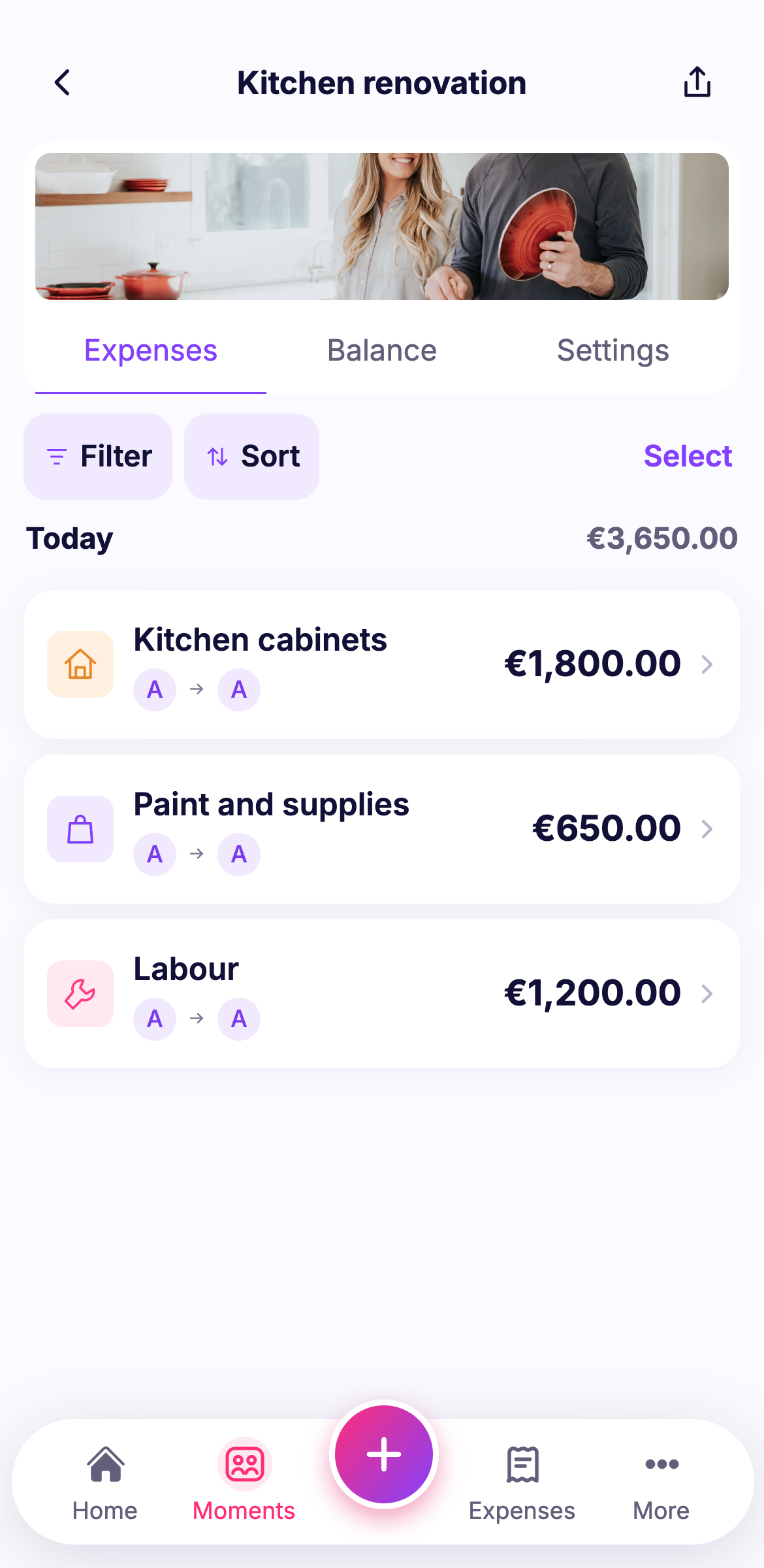
Every purchase, in one place.
Kitchen cabinets: €1,800. Paint and supplies: €650. Labour: €1,200. The total is €3,650, leaving €1,350 of your €5,000 project budget.
Captured in Spentino with the example expenses.
View full-size screenshotKnow what is left before the next purchase
Your three expenses add up to €3,650. Against the €5,000 project budget, that leaves €1,350. You can use that figure when deciding whether another purchase fits the plan.
If you buy a sink for €400, record it in the same Moment. Spending becomes €4,050 and the remaining budget becomes €950. A quotation that you have not paid is not the same as a recorded purchase: keep that distinction clear when entering your expenses.
The budget is informational. Spentino does not block a purchase or enforce a spending cap. Review the total as new costs arrive, and update the budget if your plan changes.
Managing the renovation together?
You can invite your partner from the Moment’s Settings using Invite people. They need a Spentino account to join. Adding a name as a payer or beneficiary alone does not give that person access.
Suppose Alice pays €1,800 for cupboards that Alice and Sam share equally. The project still has one €1,800 expense; each person’s share is €900, so Sam owes Alice €900 for that purchase.
The budget tracks project spending. The balances track who owes whom. A later reimbursement changes the balance, not the cost of the cupboards or the budget consumed.
Make it your own
Start with one real expense or one project. Review the people, amount, currency and Moment before saving, and build from there.
Discover Spentino